Automatic Security Audits
mrq now scans your code changes for potential security issues automatically.
What It Does
When you create a snapshot, mrq now runs a lightweight security analysis in the background. It looks for common issues that AI coding assistants sometimes introduce:
- Hardcoded secrets, API keys, or passwords
- Potential SQL injection vulnerabilities
- XSS attack vectors
- Exposed sensitive data
- Insecure configurations
- Debug or development code left in production paths
How It Works
The security audit runs in parallel with snapshot creation. It doesn't slow down your workflow or block anything. Results appear as visual indicators in the dashboard:
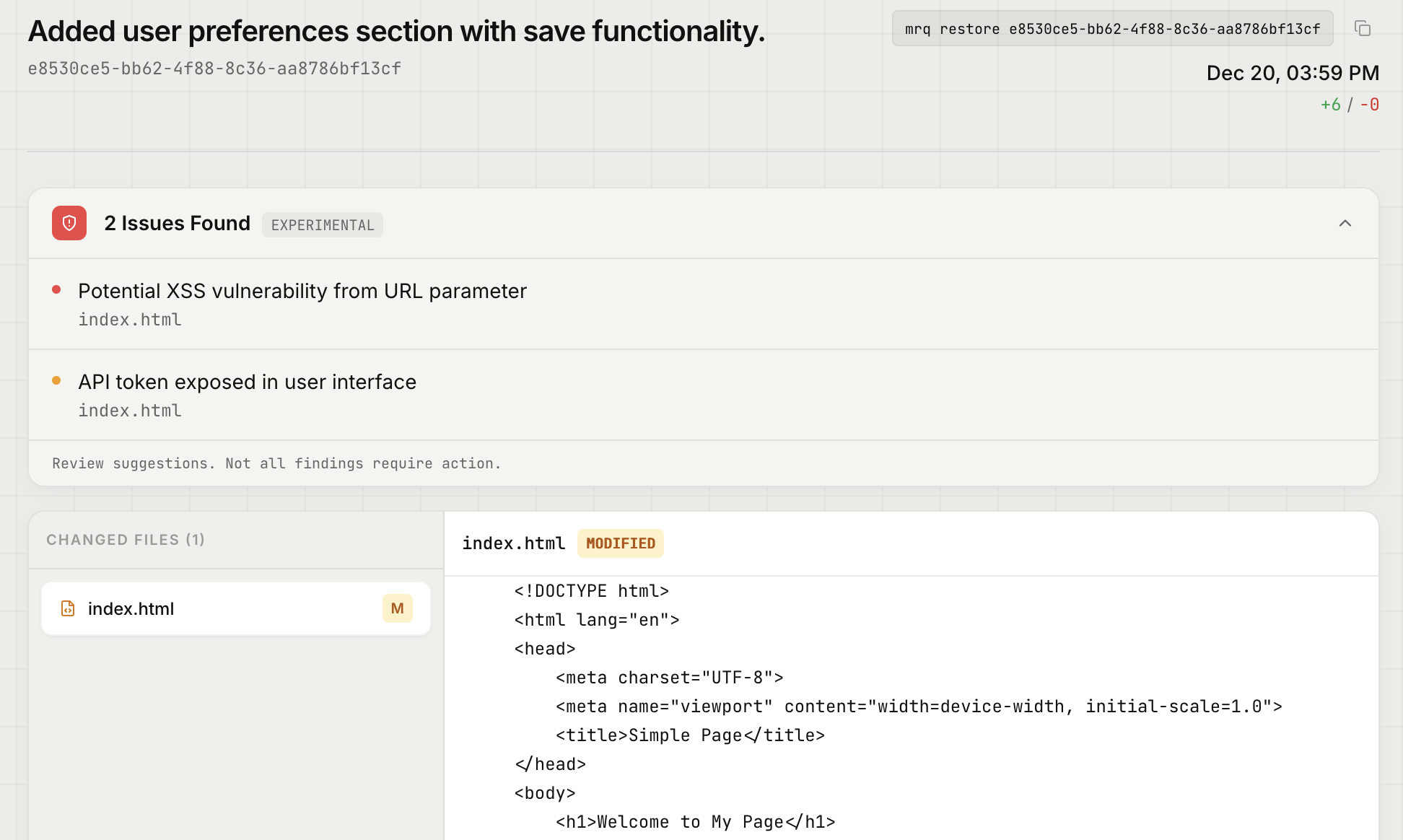
Issues are displayed inline with your snapshot history.
This Is Experimental
Security analysis is hard. We're using AI to identify patterns, which means:
- There will be false positives. Not every warning is a real issue.
- There will be false negatives. We won't catch everything.
- This is not a replacement for proper security audits or code review.
Think of it as a helpful nudge, not a comprehensive security scan. If something looks flagged, take a moment to verify. If it's a false positive, ignore it and move on.
Availability
Security audits are available on paid plans (Starter, Pro, and Team). Free tier users will not see security indicators.
This feature is experimental and may change based on feedback. We'd love to hear how it's working for you.
